App blockers for studying, compared

Start with what your phone already has: Screen Time on iPhone and Digital Wellbeing on Android lock apps for free. Pick an app when you need more: Forest or Flipd if a timer keeps you going, ScrollToll if you’d rather earn scrolling with flashcards, Freedom or Cold Turkey if the laptop is the problem, Brick if you need a lock that is hard to undo, and 12Focus if you are studying toward one exam and want app time tied to the study actions you finish.

Every price below is from the app’s US App Store listing or its own pricing page, checked on October 19, 2026. 12Focus is our app.

Updated

What should a study blocker do?

Remove the easiest exit, not your whole phone. The apps that cost study time are usually two or three: the feed, short video, a game. Block those, keep the calculator and the class chat.

Then ask three things: does it work where you study (phone, laptop, or both), how hard is it to undo at 11 pm, and does it give the time back to something?

Settings › Screen TimeFree, on every iPhone

Pick by what you need

Screen Time and Digital Wellbeing

Pick it if you want to start today, for free.

Your phone already locks apps. On iPhone, Screen Time limits and schedules apps, and a passcode someone else types makes them stick. On Android, Focus mode and app timers pause the apps you pick.

Step by step: on iPhone or on Android.

Works on
Built into iPhone and Android.
Free
Everything.
Price
Free

12Focus

Pick it if you are studying toward one exam and want app time tied to the study actions you finish.

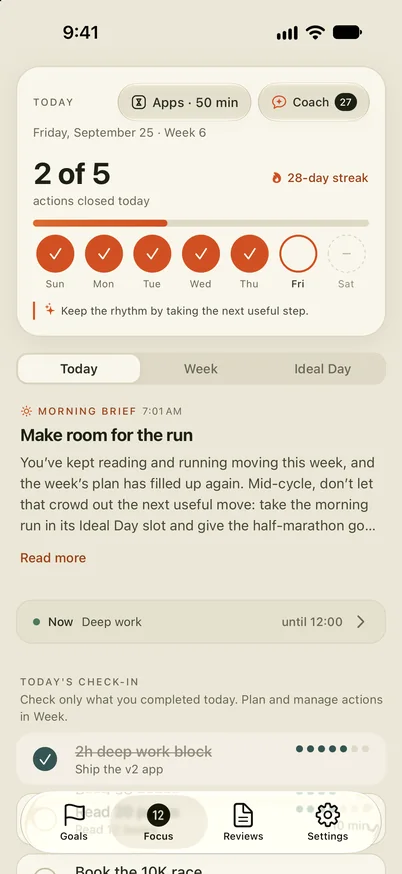
12Focus Today screen: Apps · 50 min at the top, then today’s planned actions with the finished ones ticked

Plan the exam as a 12-week goal, cut it into this week’s study actions, and give TikTok and Instagram a daily allowance. When the allowance runs out the apps pause until midnight; every planned study action you finish adds minutes back.

More on 12Focus for studying.

Works on
iPhone and Android; plan and review on the web too. Android blocks selected apps, not websites, and needs Usage Access and Accessibility permission.
Free
No free plan: free to download, using it needs a subscription. Some plans start with a free trial.
Price
$2.99 a month, $5.99 for 3 months, or $17.99 a year

Forest

Pick it if a timer with something at stake keeps you going.

A tree grows while you stay off your phone and withers if you leave. Deep Focus blocks chosen apps during a session, and you can plant together with friends.

Works on
iPhone, iPad, Android and a browser extension.
Free
The timer, Deep Focus app blocking, and a schedule for one app or site. The Android app shows ads.
Price
From $5.99 a month or $35.99 a year; coin packs from $0.99

ScrollToll

Pick it if you’d rather pay for scrolling with flashcards.

Answer one study question, from MCAT, USMLE, math or vocabulary packs or your own notes, to unlock an app for five minutes. Then it locks again.

Works on
iPhone only, iOS 18 or later.
Free
Free to download; unlimited blocking and more packs are paid.
Price
From $4.49 a week; Student $8.99 a month or $44.99 a year

Flipd

Pick it if you study better when others are studying too.

Study timers with tags, live study rooms, groups and challenges. On Android the app can lock your phone during a session; on iPhone, blocking lives in a separate app, Focus Lock.

Works on
iPhone and Android.
Free
Basic timers, free for good.
Price
From $5.99; $42.99 a year

Opal

Pick it if you want schedules plus a session you can’t cancel.

Scheduled blocks, app limits, open limits and focus sessions. Deep Focus, a paid feature, can’t be cancelled once it starts. Students get a discount.

Works on
iPhone, Android and Mac.
Free
One rule, basic timers and app blocking.
Price
$19.99 a month or $99.99 a year; weekly plans from $4.99

AppBlock

Pick it if you want blocks that follow your class timetable or the library Wi-Fi.

Schedules by time, day, location or Wi-Fi, usage limits, and a Strict Mode with a cooldown or someone else’s approval. It has a student plan.

Works on
iPhone, Android, and Chrome, Edge and Brave extensions.
Free
A limited free plan.
Price
From $4.99 a month or $29.99 a year

Freedom

Pick it if you study on a laptop and the browser is the problem.

Block apps, websites or the whole internet on every device at once. Locked Mode stops edits to a running session and allows one early end every seven days.

Works on
Mac, Windows, iPhone, Android, ChromeOS and Linux.
Free
Block sessions on unlimited devices. Scheduling, recurring sessions and Locked Mode are Premium.
Price
$8.99 a month, $39.99 a year, or $199 once

Cold Turkey Blocker

Pick it if you only need the computer locked, for good.

Blocks websites for free; the Pro version blocks apps too, on schedules, with locks you can’t undo until the time is up.

Works on
Windows and macOS only.
Free
Website blocking.
Price
$45 once for Pro, on all your computers; 20% off for students

Brick

Pick it if you need a lock that is hard to undo from your desk.

Tap your phone on a small physical Brick to block the apps and sites you chose, including a study mode; tap it again to unblock. Leave the Brick at home and the apps stay closed, apart from five emergency unblocks.

Works on
iPhone on iOS 18 or later, Android 12 or later.
Free
The app is free; it needs the device.
Price
$59 for the Brick, no subscription

Side by side

US prices, checked on October 19, 2026. Prices change and differ by country, so check the store before you buy.

AppWorks onHow it blocksFree planPaid from
Screen Time and Digital WellbeingiPhone, AndroidLimits and schedulesEverythingFree
12FocusiPhone, AndroidDaily allowance, earned by finished actionsNo$2.99/mo, $17.99/yr
ForestiPhone, Android, browserTimer with app blockingYes$5.99/mo
ScrollTolliPhoneStudy question to unlockLimited$4.49/wk
FlipdiPhone, AndroidTimer; locks on AndroidYes$5.99
OpaliPhone, Android, MacSchedules, Deep FocusOne rule$4.99/wk
AppBlockiPhone, Android, browsersSchedules by place and timeLimited$4.99/mo
FreedomMac, Windows, phonesSessions across devicesSessions$8.99/mo
Cold Turkey BlockerWindows, macOSWebsite and app locksWebsites$45 once
BrickiPhone, AndroidPhysical tapApp only$59 once

Questions, answered

Is there a free app blocker for studying?

Yes. Screen Time on iPhone and Digital Wellbeing on Android are built in and free. Forest blocks apps during a session for free, and Cold Turkey blocks websites on a computer for free.

How do I block apps on my phone while studying?

Set a daily limit or a schedule for the apps that pull you away, and let someone else set the passcode. 12focus.app has step-by-step guides for iPhone and Android. The iPhone guide, the Android guide.

Which app blocker also works on a laptop?

Freedom blocks apps and websites on Mac, Windows, ChromeOS and Linux and syncs with your phone. Cold Turkey locks a Windows or Mac computer only. Opal also runs on a Mac.

Can I make a block hard to undo?

Brick needs the physical device to unlock, apart from five emergency unblocks. Opal’s Deep Focus, AppBlock’s Strict Mode and Cold Turkey’s locks can’t be ended early once they start; Freedom’s Locked Mode allows one early end every seven days.

Do app blockers help you study?

They remove the easiest way out; they don’t do the studying. They work best with a plan for what each session is for, so the time you take back has somewhere to go. Here is how to plan the weeks.

Which one is made for exams?

ScrollToll asks a study question before it unlocks an app, and 12Focus plans an exam as a 12-week goal with this week’s study actions. Forest and Flipd keep you going with timers.

Study first, then scroll

12Focus plans the exam as a 12-week goal, gives the apps you choose a daily allowance, and adds minutes each time you finish a study action you planned.