Opal alternatives with prices checked

The closest alternatives to Opal: one sec and Clearspace put a pause before an app opens, ScreenZen does it for free, Brick and Foqos lock with a tap, Freedom covers the laptop too, and Jomo and AppBlock run rules like Opal’s. 12Focus is the one to pick if you want the time you take back to go to a goal.

Every price below is from the app’s US App Store listing or its own pricing page, checked on October 19, 2026. 12Focus is our app.

Updated

Why look for an Opal alternative?

Opal blocks apps on iPhone, Android and Mac with schedules, app limits, open limits and focus sessions. Its Deep Focus can’t be cancelled once it starts. The free plan covers one rule; Pro costs $19.99 a month or $99.99 a year on opalapp.com.

People usually switch for one of four reasons: the price, wanting something gentler, wanting something stricter, or wanting the blocked time to go somewhere. Each pick below answers one of them.

Opal › iPhone, Android, MacFree: one rule · Pro $99.99 a year

Pick by what you need

12Focus

Pick it if you want the time you take back to go to a goal.

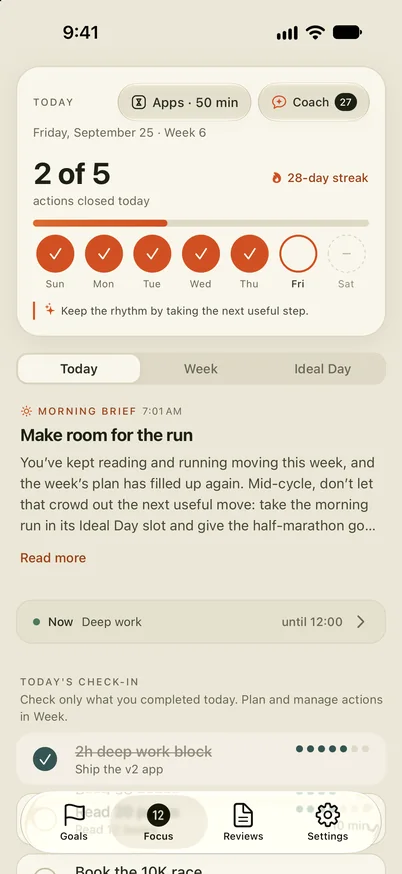
12Focus Today screen: Apps · 50 min at the top, then today’s planned actions with the finished ones ticked

Plan up to three goals for 12 weeks and a few actions each week. The apps you choose get a daily allowance; when it runs out they pause until midnight, and every planned action you finish adds minutes back.

The full head-to-head: 12Focus vs Opal.

Works on
iPhone and Android; plan and review on the web too. Android blocks selected apps, not websites, and needs Usage Access and Accessibility permission.
Free
No free plan: free to download, using it needs a subscription. Some plans start with a free trial.
Price
$2.99 a month, $5.99 for 3 months, or $17.99 a year

one sec

Pick it if you want a pause, not a wall.

A breathing pause before a chosen app opens, so the reflex has to wait. It can also send you out after a set time, and run full block sessions on a schedule.

Works on
iPhone, iPad, Mac and Android, plus a browser extension.
Free
Free for one app.
Price
$6.99 a month, $19.99 a year, or $99.99 once

ScreenZen

Pick it if you want it free.

A delay before an app opens that can grow with each open, prompts that ask if this is important, open limits, schedules and a strict block that also locks its own settings.

Works on
iPhone, iPad, Mac, Windows and Android.
Free
Everything; the app is supported by tips.
Price
Optional tips from $5

Brick

Pick it if you want a lock that is hard to undo from the couch.

You tap your phone on a small physical Brick to block the apps and sites you chose, and tap it again to unblock. Five emergency unblocks are included.

Works on
iPhone on iOS 18 or later, Android 12 or later.
Free
The app is free; it needs the device.
Price
$59 for the Brick, no subscription

Foqos

Pick it if you like the tap-to-lock idea without buying hardware.

Tap an NFC tag or scan a QR code to block the apps you chose; unlocking needs the same tag or code, so you can leave it in another room.

Works on
iPhone only, iOS 17.6 or later.
Free
Everything; optional tips.
Price
Free, tips from $1.99

Freedom

Pick it if your distractions live on the laptop too.

Block sessions for apps, websites or the whole internet, synced across all your devices. Locked Mode stops edits to a running session and allows one early end every seven days.

Works on
Mac, Windows, iPhone, Android, ChromeOS and Linux.
Free
Block sessions on unlimited devices. Scheduling, recurring sessions and Locked Mode are Premium.
Price
$8.99 a month, $39.99 a year, or $199 once

Jomo

Pick it if you want a block that ends when you do something.

Rules that block at set times, after a limit, or until you take an action, such as walking 5,000 steps. Strict Mode makes a rule hard to switch off.

Works on
iPhone, iPad and Mac. No Android app found.
Free
One session, one action or limit, one screen-time budget.
Price
$5.99 a month or $29.99 a year; Student $14.99 a year

AppBlock

Pick it if you want the most ways to schedule a block.

Schedules by time, day, location or Wi-Fi, launch and usage limits, and a Strict Mode with a cooldown or someone else’s approval. It blocks websites and keywords too.

Works on
iPhone, Android, and Chrome, Edge and Brave extensions.
Free
A limited free plan; longer blocks and more schedules are paid.
Price
From $4.99 a month or $29.99 a year

Clearspace

Pick it if you want a breath before the feed, with a friend in on it.

A deep breath before a chosen app opens, then you continue or step away. App limits, schedules, challenges and accountability partners.

Works on
iPhone and Android, plus a Chrome extension.
Free
Free for one app.
Price
$6.99 a month or $44.99 a year

Side by side

US prices, checked on October 19, 2026. Prices change and differ by country, so check the store before you buy.

AppWorks onHow it blocksFree planPaid from
12FocusiPhone, AndroidDaily allowance, earned by finished actionsNo$2.99/mo, $17.99/yr
one seciPhone, iPad, Mac, AndroidPause before openingOne app$6.99/mo, $19.99/yr
ScreenZeniPhone, Mac, Windows, AndroidGrowing delay, limits, strict blockEverythingTips
BrickiPhone, AndroidPhysical tap to lock and unlockApp only$59 once
FoqosiPhoneNFC tag or QR codeEverythingTips
FreedomMac, Windows, iPhone, Android, moreSessions across devicesSessions$8.99/mo, $39.99/yr
JomoiPhone, iPad, MacRules, unlock by an actionLimited$5.99/mo, $29.99/yr
AppBlockiPhone, Android, browsersSchedules, limits, Strict ModeLimited$4.99/mo, $29.99/yr
ClearspaceiPhone, AndroidPause, limits, partnersOne app$6.99/mo, $44.99/yr

Questions, answered

Is there a free alternative to Opal?

Yes. ScreenZen and Foqos are free and run on tips, one sec and Clearspace are free for one app, and Freedom’s free plan runs block sessions. Your phone’s own Screen Time or Digital Wellbeing is free too.

Is there an Opal alternative for Android?

one sec, ScreenZen, Brick, Freedom, AppBlock, Clearspace and 12Focus all run on Android. Jomo and Foqos are iPhone only.

Which Opal alternative is hardest to get around?

Brick and Foqos, because unlocking needs a physical tag or code you can leave in another room; Brick also includes five emergency unblocks. ScreenZen’s strict block and AppBlock’s Strict Mode lock their own settings.

Which alternative also blocks on a computer?

Freedom blocks apps and websites on Mac, Windows, ChromeOS and Linux and syncs with your phone. one sec, ScreenZen and Jomo also run on a Mac.

How much does Opal cost?

On opalapp.com, Pro is $19.99 a month or $99.99 a year, and the free plan covers one rule. The US App Store also lists weekly plans from $4.99. Checked on October 19, 2026.

How is 12Focus different from Opal?

Opal is built to block; 12Focus is built around a 12-week goal and uses blocking to protect it. The apps get a daily allowance, and each planned action you finish adds minutes.

Give the minutes a goal

12Focus gives the apps you choose a daily allowance and adds minutes each time you finish an action you planned, so the time you take back goes somewhere.